Concern to Control: The Shadow AI Blind Spot
See how security and IT leaders are responding to AI risk and incidents.

Executive Summary
Security teams deployed the tools they were told to deploy. AI moved to a surface those tools were never built to watch.
Enterprise AI adoption is now measured in tokens, credits, and daily usage — not in experiments or pilots. In our companion report, Quantifying Shadow AI Risk in the Browser, 70.9% of knowledge workers reported using AI tools at work daily or more often, 63.4% described AI as essential or very necessary to their job, and 39.6% knowingly used AI tools their company had not approved.
This report asks the other half of the question: how do security and IT leaders see and manage AI use inside their enterprises? It combines two parallel surveys fielded in May 2026 — 227 U.S. knowledge workers and 169 U.S. security and IT leaders — to show where workforce behavior and security perception converge, where they diverge, and where the widest gaps sit.
The tools in place today were designed for a previous class of surface: managing credentials, stopping files from leaving the perimeter, detecting malware on endpoints, monitoring network anomalies inside the boundary. None of them were designed to see what happens inside a browser session when a workforce pastes text into personal AI account.
Three questions and key insights
Question 1: What do security teams believe they know?
Confidence in AI security programs is high: 75.1% of security and IT leaders say their approval process can keep pace with AI adoption, and 69.8% claim event-level visibility into AI tools in use.
But 59.2% have also confirmed an AI-related incident in the past 12 months, and 92.9% acknowledge at least one blind spot in their AI observability.
Question 2: What are workers doing, and how much of it does security see?
25.6% of knowledge workers have pasted or uploaded company financial data into an AI tool. Security teams estimated exposure at 8.9%.
Where security has direct technical instrumentation into a data category — credentials in vaults and logs — their estimated exposure or data leakage tracks with the workforce's admission. Where they don’t, security and IT systematically under-count, and the gap widens with the stakes.
Question 3: What is stopping security & IT from reducing AI risk?
Skills (28.4%) and organizational silos (27.8%) outrank budget (23.7%) as the top obstacles.
When leaders name where they plan to invest, browser security (32.5%) leads by a substantial margin, ahead of AI gateways (26.6%); every other category sits below 21%. This highlights that leaders are converging on controls at the point of intent.
What this means: The control popint has moved to the browser session — the prompt, the paste, the click. Visibility that stops at the authenticated edge can only see sanctioned use, not actual use.
Finding 01: Visibility Claims vs Anonymous Sessions
Leaders can't see what they think they see
69.8% of surveyed security leaders state they have event-level visibility into the AI tools that employees use, and 66.3% claim event-level visibility into the data being put into AI tools.
Among those who strongly agree — the population with the most confident visibility claim — a cross-tabulation reveals a contradiction: three-quarters or more also believe employees use AI tools anonymously always, often, or sometimes.
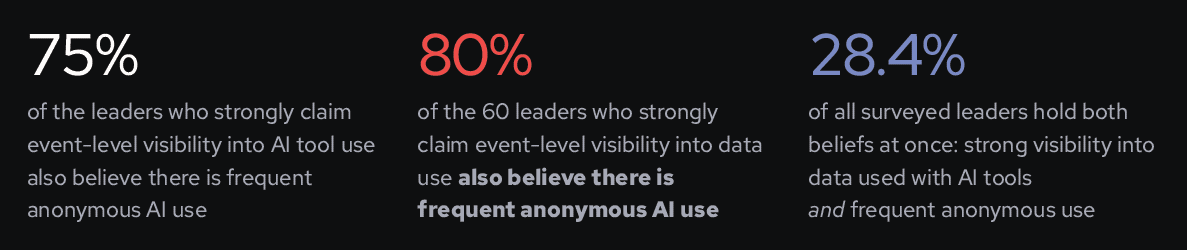
But anonymous AI sessions produce no attributable event stream. What the most confident leaders are describing is likely visibility into sanctioned, authenticated AI use. This is not the same as visibility into what is actually happening across and inside anonymous AI sessions.
Finding 02: Worker Admissions vs Security Estimates
More company data is leaking than security leaders think
We asked knowledge workers what they had pasted or uploaded into AI tools, and asked security and IT leaders what they believed employees had put in. Across seven categories, workers reported higher leakage than security estimated in three areas: financial information, sensitive or regulated data, and source code. The higher the risk of the category, the wider the under-count.
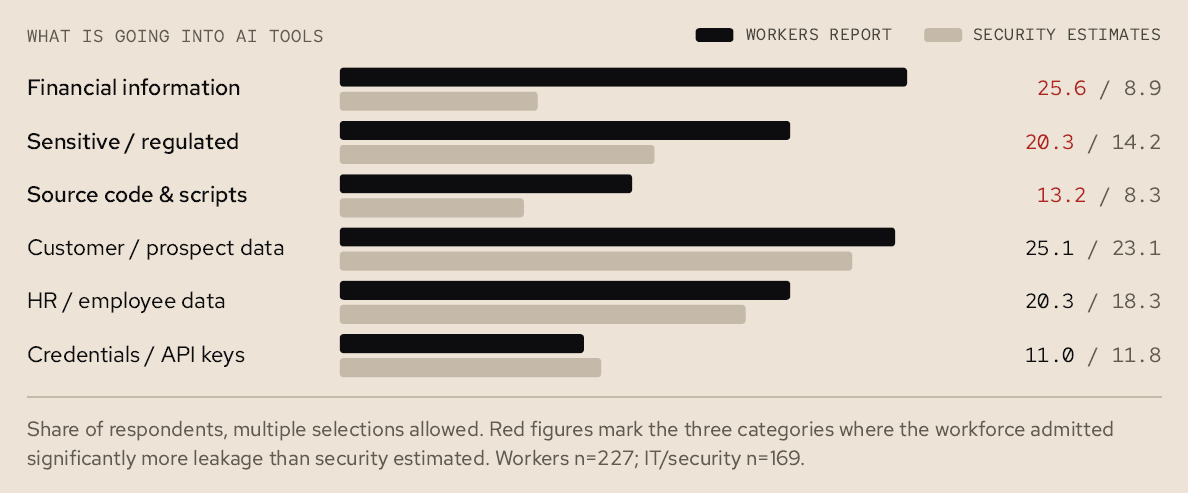
Financial figures, source code, and personal data live inside SaaS apps, spreadsheets, and code repositories that were never built to log a paste event. When an employee copies from one of those systems into a personal AI account, the action doesn’t appear on any control surface the security team owns.
Why credentials are the exception
The pattern is not random; it maps to instrumentation. Credentials are issued, revoked, rotated, and audited by IT and security as part of daily operations: they appear in logs, they exist in vaults, and that instrumentation pre-dates AI adoption by decades. Where security teams have that direct technical instrumentation, perception and reality align. Where they don’t, they under-count the highest-stakes categories.
Finding 03: Both Sides Know the Workarounds
Everyone expects the workforce to work around AI policies
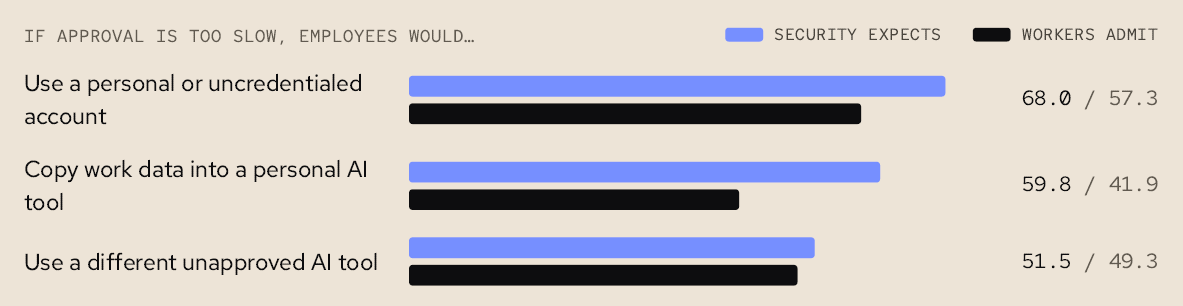
75.1% of security and IT leaders believe they can keep pace with AI-tool approval requests, but 20.7% also say their most recent request took more than a month to resolve.
What this means
Workers do not route around approval processes they experience as reasonable. They route around processes they view as roadblocks — and 41.4% of workers expect approval for a new AI tool to take more than two weeks.
Finding 04: AI Security Incidents are Already Here
100 security leaders confirmed an AI-related security incident in past 12 months.
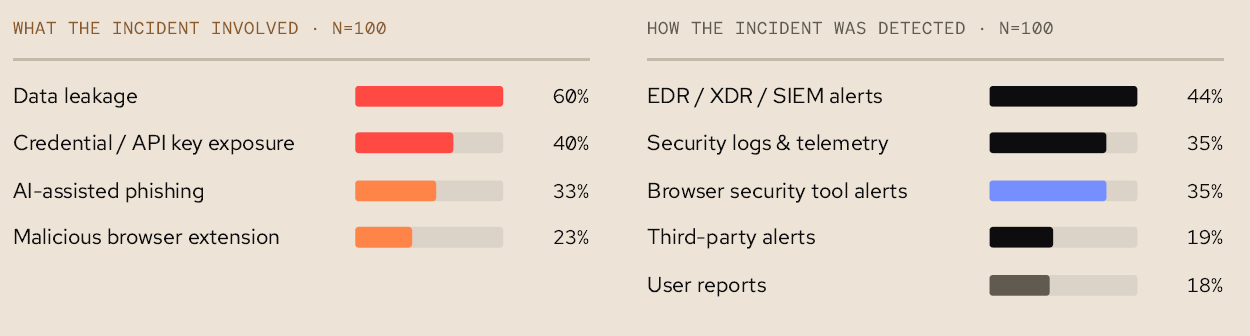
Nearly 6 in 10 organizations have already handled an AI-related security incident. This is not a projection: an event occurred, was investigated, and produced a response. Of the 169 total respondents, 100 confirmed an AI-related security incident. 60% of those respondents confirmed that the incident involved data leakage while 40% involved credentials or API keys.
Reactive detection is the norm
AI-related security incidents are typically caught after the fact — via EDR, XDR, SIEM alerts, or log and telemetry review — because 82% of the time, the employee involved never reports it. Awareness-based investments — training, policy reviews, communication — leave the employee free to complete the action. But the common issue: Every one of those paths reports a loss that has already happened.
What this means
What security teams need is the proactive capability to block at the point of click: disabling copy and paste into a prompt or form field can dramatically reduce data leakage from shadow AI use. The fact that 35% of incidents are already being identified via browser security tools show how critical this capability is becoming in security stacks.
Finding 05: Why most organizations can't stop shadow AI
Current controls vs blind spots
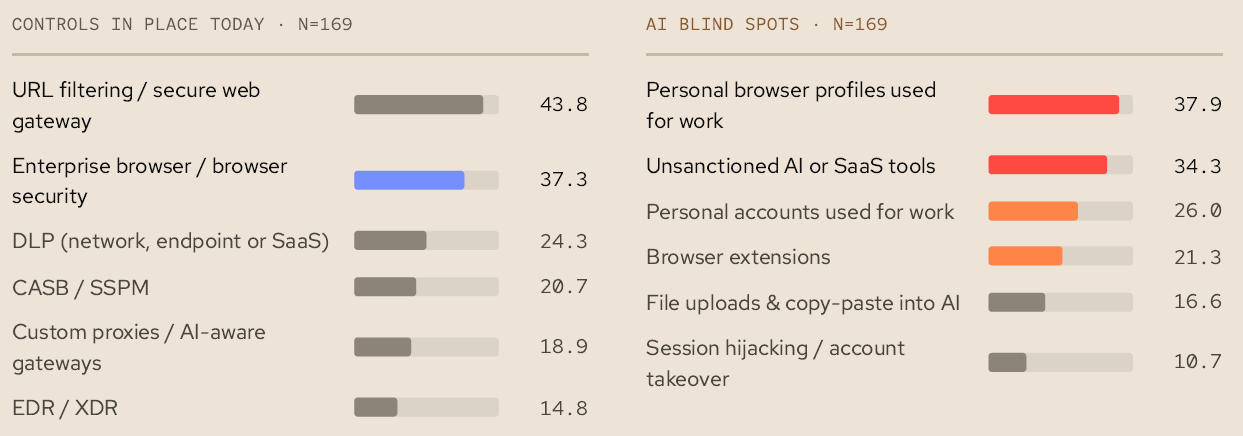
92.9% of security leaders acknowledge at least one blind spot in their AI security and governance stack. Only 7.1% of respondents said they had no blind spots when it came to shadow AI.
Asked what controls their organization uses to govern workforce AI activity, the most common answer was URL filtering or a secure web gateway. These tools can block a domain, but they cannot see what is typed into a site or application — and they cannot keep pace with new AI tools entering the market faster than any blocklist can be updated.
The most-deployed control (URL filtering / SWG) currently only sees destinations. But the greater risk lives in the prompt and content.
Ownership Fragmentation
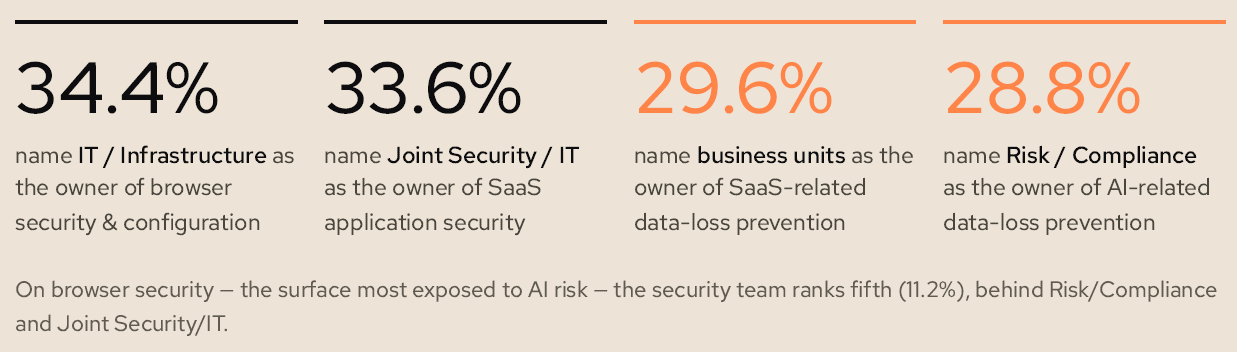
Another reason why most enterprises are struggling to find and manage shadow AI? Lack of clear ownership for the problem.
13.0% of leaders say their organization has no clear owner of AI security risk at all. Where an owner does exist, it is rarely the security team; it is a different team for each domain.
Finding 06: What Security Leaders Plan to Do about Shadow AI
51.5% of security leaders are looking into browser security or AI gateways to manage the shadow AI problem.
Browser security operates at the point of intent, in the interface where copy and paste events happen. AI gateways sit in the network path between the workforce and the AI provider, inspecting content in flight. Both address surfaces that URL filtering and DLP were never designed to reach.
Browser security also layers onto the browsers employees already use — no re-platforming, no new workflow, no added deployment burden on IT. That adoption advantage may explain why it is outpacing every other category leaders are considering.
Email me this report